
Security Vision
Security Vision recently announced major updates to the TIP, SGRC, IRP/SOAR, UEBA and Anomaly Detection systems on the Security Vision 5 platform. We have compiled these updates into a single article that details what they are and how they enhance a company's information security posture.
Security Vision Threat Intelligence Platform (TIP)
Security Vision Threat Intelligence Platform (TIP) is an updated product from Security Vision. What is the purpose of this solution, what does it represent and what opportunities does it offer to businesses? Let's get to the bottom of it.
What is TIP for?
Every year more and more processes in companies are transferred to the virtual sphere, and as a consequence, the number of threats related to unauthorised access to information is growing. Modern organisations are starting to form a much larger digital footprint, so information security tools must also evolve. You need to analyse your company's risks, investigate threat sources and attack indicators, and monitor the presence of signs of compromise in your infrastructure, thus building your own unique threat landscape.
Threat Intelligence Platform is a class of automated systems that, based on threat data (it can be IOC, IOA, TTP, etc.), generate real-time detections of suspicious activity in the Customer's infrastructure, perform enrichment of indicators and detected incidents, integrate with the Customer's infrastructure and defences, and provide situational awareness.
The market for threat analysis and cyber intelligence solutions is a fast growing and evolving market. The TI solutions on the market differ from each other, including the coverage of the data layers they operate on. In the Russian segment, TI is traditionally divided into four main levels: technical, tactical, operational and strategic. Before TIP, SOAR or IRP class systems used to turn to feeds to check an incident already generated by internal rules for involvement in compromised indicators (IoC).
With the advent of TIP, it is now possible to generate incidents based on indicators of compromise identified in the internal infrastructure. It became possible to build links between incidents, attack indicators (IoA) and other types of threats. Finally, information about attackers' techniques and tactics began to be accumulated and systematised, and retro-analysis became possible.
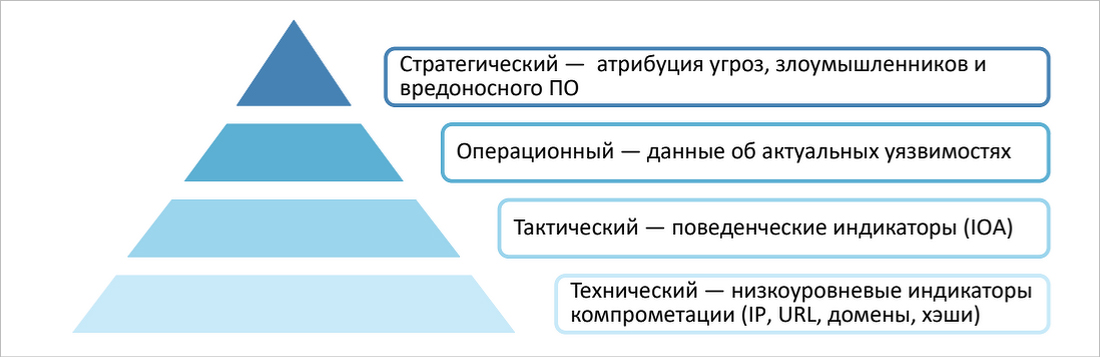
Security Vision TIP
TIP interacts with other information protection tools, infrastructure objects and external services. It looks to feed providers and analytics services for IoC, IoA, threats, attacker and malware information, vulnerabilities, bulletins. Event information for matchmaking is collected from primary sources (Web Proxy, Linux server, Windows server, NGFW), Data Lake and DB (Apache Kafka, PostgreSQL, MS SQL), SIEM, EDR, and others.
Incident and indicator data can be automatically or manually transferred to SIEM, SOAR/IRP, NGFW, etc. Security Vision's TIP software product has developed functionality to cover the needs of every level of TI. The solution helps to search for signs of attacks based on behavioural indicators and build a long-term strategy of information security of the enterprise taking into account current threats and risks.
TIP is based on the unified Security Vision platform. Customers have access to all the benefits of the platform, including extensive customisation options. The solution is fully parametric, and no programmer is required to create a new connector, report or dashboard: everything is configured through the user interface with appropriate administrative rights.
Security Vision TIP architecture
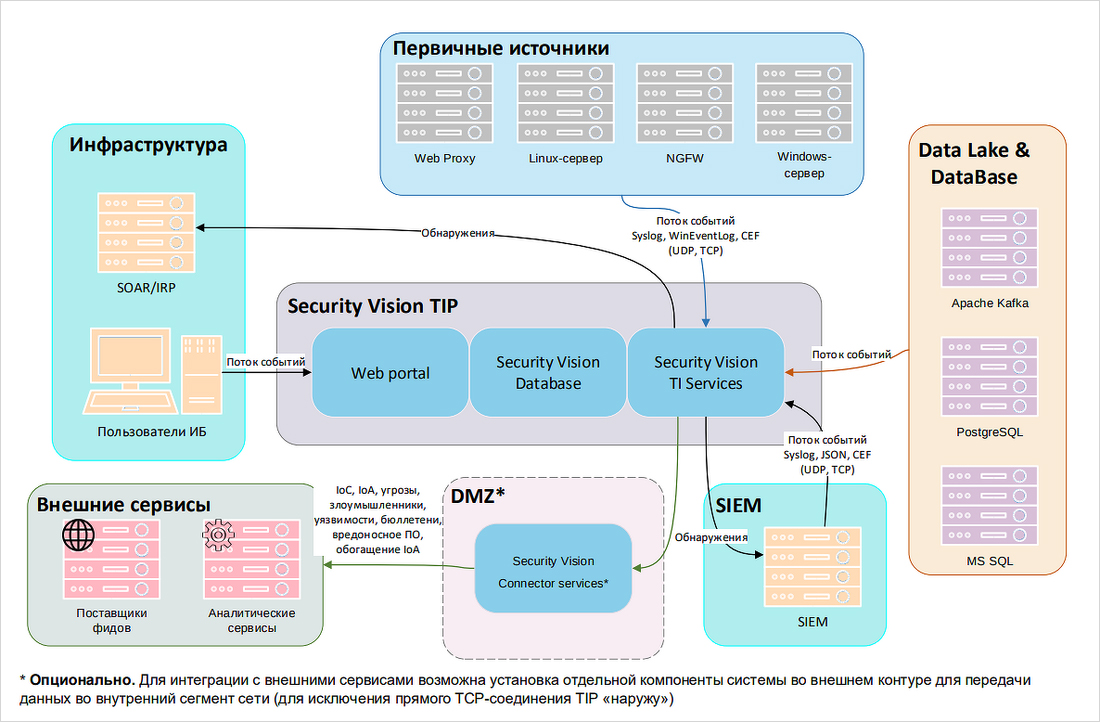
When implementing the Security Vision TIP platform at the customer's premises, it is possible to install all components on a single virtual server or spread the components across different servers for load balancing. The system architecture supports full fault tolerance of all components. The platform does not require direct access to the Internet, interaction with feed providers and external analytical services is possible through a special dedicated component located in the DMZ segment.
For all components of the platform it is supported to work on any OS: MS Windows, Ubuntu, CentOS, RedHat, Oracle Linux, Alt Linux, Astra CE ‘Orel’, Astra SE ‘Smolensk’/‘Voronezh’/‘Orel’. PostgreSQL, Postgres Pro or Microsoft SQL Server are used as DBMS.
Data loading
Security Vision TIP supports loading an unlimited number of various TI sources (feeds). For example, a list of suspicious IP addresses for the last month or attribution of attackers, APT attacks and malware, etc.
The basic delivery already includes integration with the most popular services that provide various indicators of compromise. These include Russian feed providers (Kaspersky, Group IB, BI.ZONE, RSTCloud), public platforms (Alien Vault, MISP, GitHub), popular open source feeds (Feodo Tracker, Digital Side, URL Haus, etc.), universal connectors to STIXII and other common formats.
In addition to compromise indicators, the system loads attack indicators, threat sources and other additional attributes received from both feed providers and specialised external services.
The system allows the user to add any indicator source using either a standard format (MISP, STIX2, etc.) or a unique proprietary format. For each source and feed, the user can set an arbitrary filter for selecting the downloaded data.
Individual schedules can be configured for each data load, both per vendor and per feed.
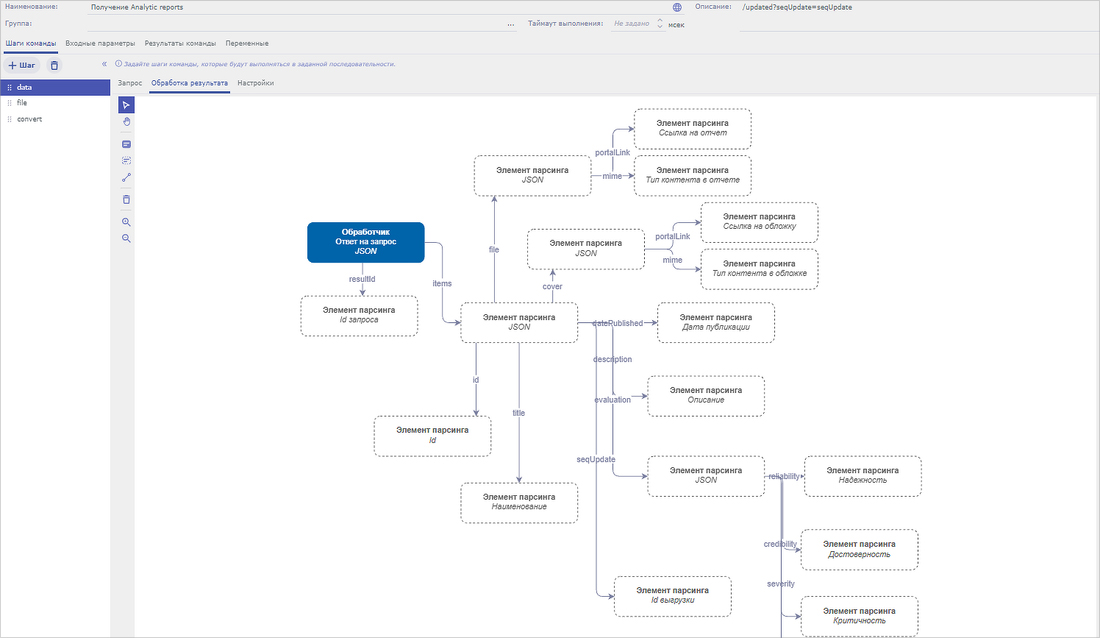
API
In TIP platform there is a possibility to upload data via API, which works by standard REST/JSON mechanisms via HTTP/HTTPS. It is possible to upload data both by IoC (e.g. for incident enrichment in external systems IRP, SOAR, SIEM, asset management systems, etc.) and by detections and any other system objects (IoA, threat sources, vulnerabilities, bulletins, etc.). It is also possible to create new indicators in TIP through the API.
Indicator sources
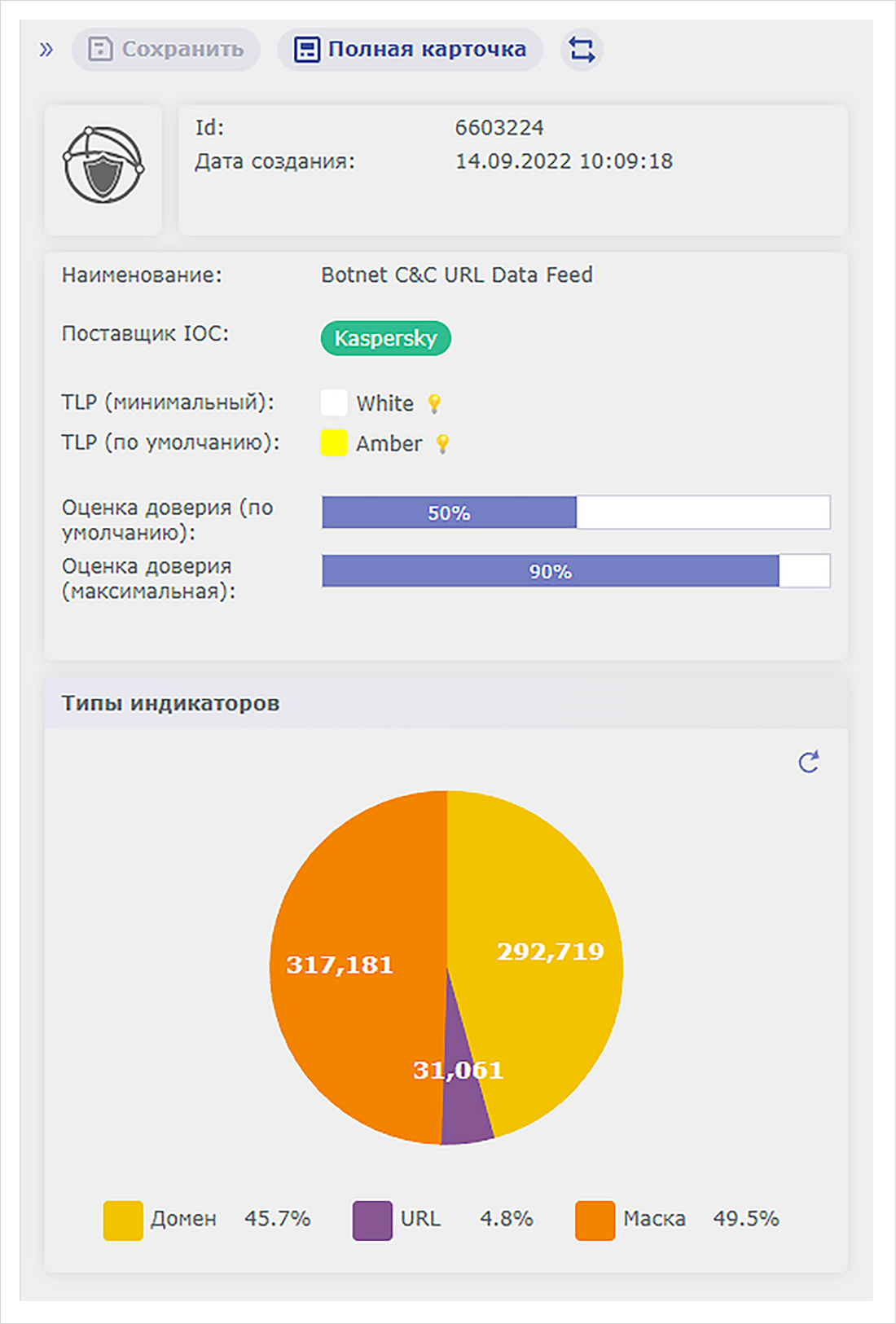
For each feed, system users can view and edit information about IOC, vendor, source trust scores, TLP, etc.
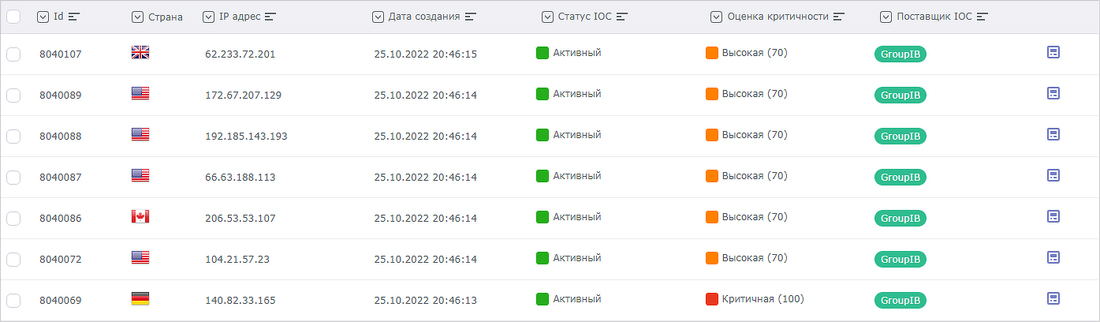
Indicator List
In Security Vision's TIP platform, indicators can be viewed as a general list or grouped by type, criticality, infrastructure detection, etc. The system provides three options for easy search of the required indicators:
Full-text search - searches the value by the displayed IOC attributes;
Quick - search by selected attribute;
General - complex filter, with unlimited number of nesting levels of conditions on different IOC attributes.
The user can save the configured filter for reuse.
The user can perform preconfigured mass operations on the selected indicators, mark them as False-Positive, send them to NGFW, etc. The user can also create arbitrary mass operations. It is also possible to create an arbitrary mass operation, for example, to change attributes of selected IOCs or send them to an external system.

Indicator card
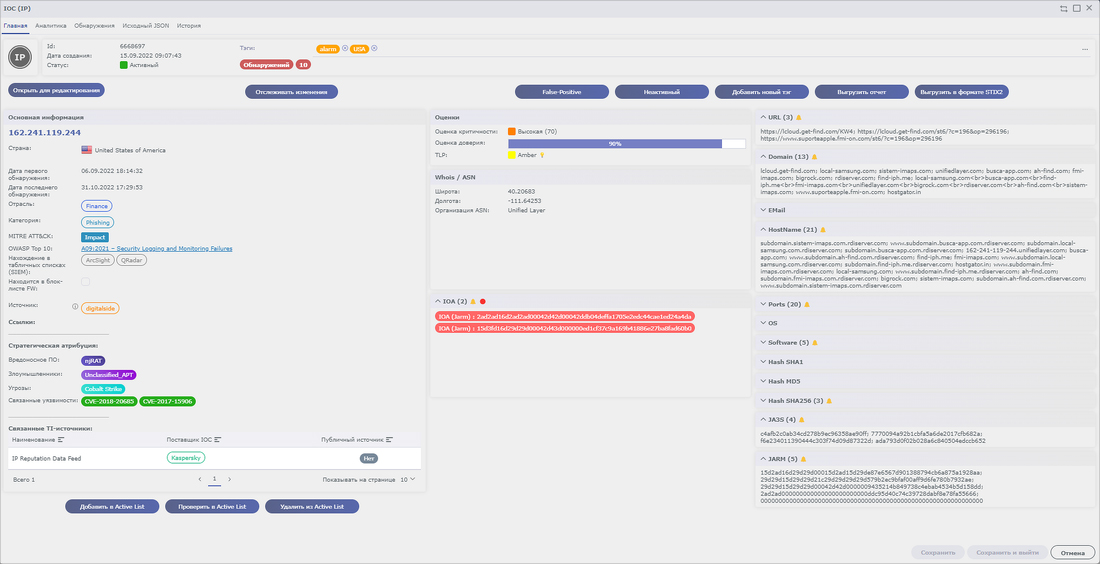
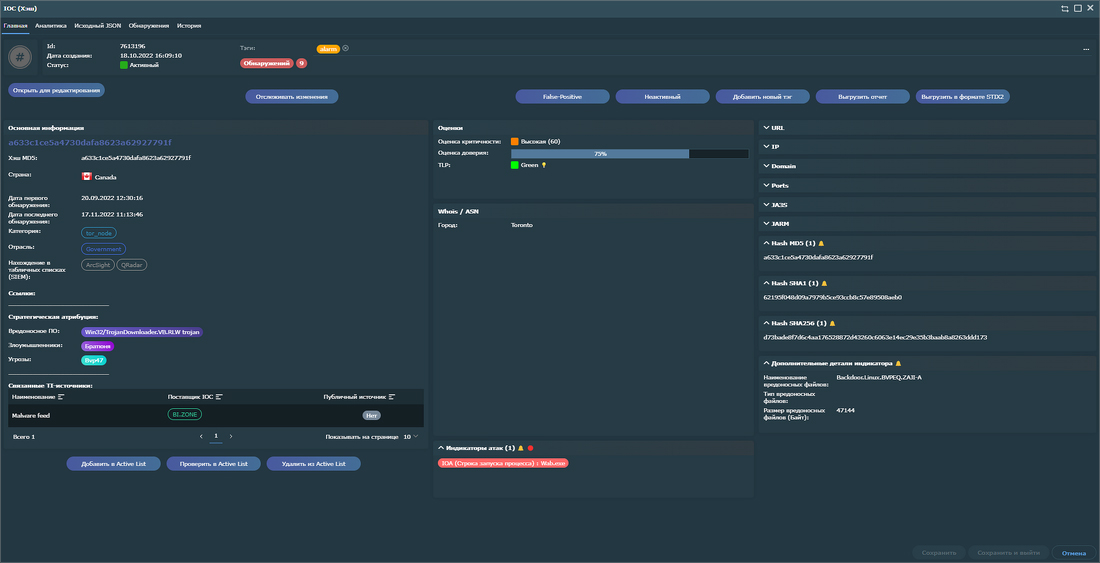
For each indicator you can view detailed information, which displays:
Detection dates (including in the Customer's infrastructure);
Indicator geodata;
Life cycle status;
Assessments (trust, criticality, TLP, etc.);
Links to IOC and IOA indicators, MITRE ATT&CK, industries, categories, kill chain stages;
Strategic attribution - related malware, attackers, threats, vulnerabilities;
Information from analytics services;
Detection information;
‘Raw’ indicator data from the vendor (JSON);
History of changes in the indicator;
etc.
Information from different suppliers is automatically deduplicated in the IOC card, the user can set flexible settings on the priority of suppliers and merging of received data.
For each indicator it is possible to perform a certain set of preconfigured actions, for example, edit indicator values, add to favourites, upload in STIXII format, etc. This set can be extended by other actions.
This set can be extended by other actions through the corresponding system constructor.
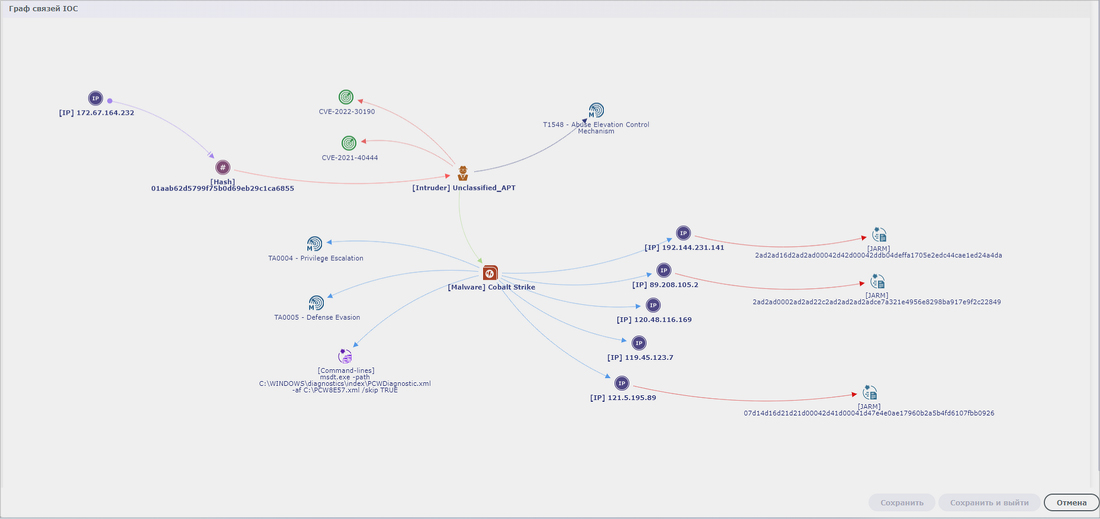
In a special section Analytics in a graphical form for each indicator, the user can analyse links with other indicators/IOA/sources of threats, perform enrichment of IOC from external analytical services, perform actions both on the indicator itself and on related objects.

On the indicator card it is possible to upload a preconfigured report in a standard format (PDF, Word, Excel, ODS, ODT, etc.) containing all necessary information on the indicator. The user can adjust the report format through the constructor available in the platform and working on the no-code principle.
The system implements the indicator life cycle, which the user can manage both manually and automatically, setting the parameters of activity and presence in the system for each type of indicator through special settings.
Scoring
By default, TIP trusts the scoring given to the indicator by the vendor. For cases where an indicator is received from a vendor without a criticality score, Security Vision has developed a proprietary model for calculating the criticality of compromise indicators that takes into account, among other factors, the credibility, category significance, and relevance of the indicator.
Whitelisting
During the threat analysis process, it may be necessary to introduce certain exceptions into the detection process to exclude legitimate activities of the user, Customer infrastructure or trusted sources and thereby reduce the number of False-Positive. In the TIP platform, exceptions can be started in a special ‘whitelist’ that specifies IP address ranges, parts of domains and URLs.
Detection process
The main functionality of the platform is to search for indicators of compromise in the infrastructure and, if detected, create incidents. For efficient and complete operation it is necessary to connect to the system event streams from the maximum number of primary sources from the Customer's infrastructure: network traffic, events from servers and workstations, mail traffic, logs from Web and proxy servers, etc.
Security Vision TIP implements the following mechanisms for receiving events to detect suspicious activity:
receiving a data stream via TCP/UDP;
access to APIs of external systems;
receiving events from the queue (Kafka, RabbitMQ);
execution of queries in the database/DataLake.
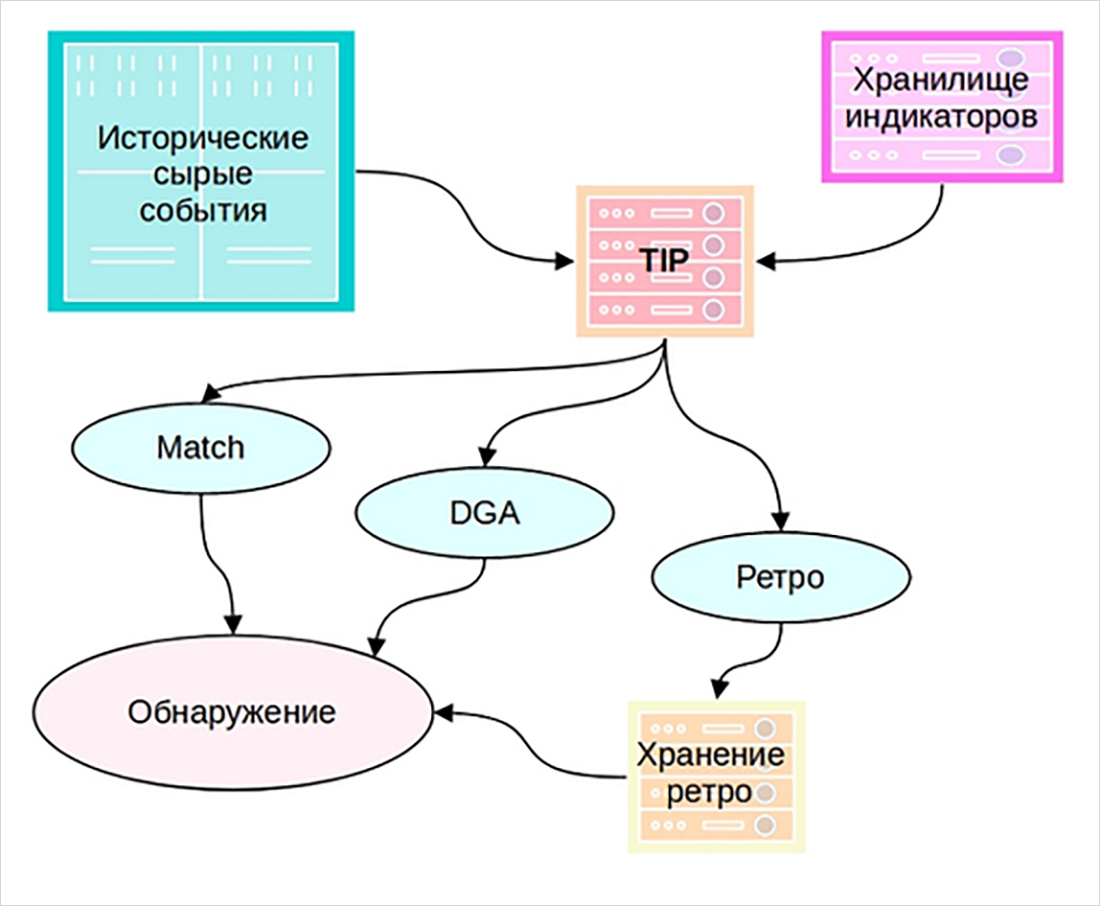
В Платформе реализованы преднастроенные коннекторы для получения событий из всех популярных SIEM-систем (MaxPatrol SIEM, Kaspersky KUMA, IBM QRadar SIEM, Microfocus ArcSight, и др. ), NGFW (Cisco, Checkpoint, Juniper, F5, etc.), proxy servers (Squid, BlueCoat, etc.), mail servers (including analysis of mail messages), Windows/Linux servers, Kafka/RabbitMQ event queues, etc., and others.
Universal data stream reception by standard formats: Syslog, CEF, LEEF, EBLEM, Event log.
Matching
Security Vision TIP uses its own optimised matching engine, which allows to perform detection on large data streams with an impressive IoC database. The system has performed consistently on 100,000 EPS, with over 10 million indicators.
The solution uses an optimised algorithm to work on Mask-type IoCs supplied by, for example, Kaspersky.
Retro Search
A very useful feature of Security Vision TIP is retro search. The system stores data received from related systems over a long period of time (e.g. a month or a quarter - configurable in the system) in an optimised form, and new indicators of compromise are matched with events that occurred in the past. In this way, you can see which internal infrastructure items were compromised before the threat was reported. You can set up a schedule and perform retro-analyses automatically, for example at night when the load on the system is minimal.
DGA / Phishing
An important functionality of Security Vision TIP is a heuristic engine that uses various ML models to automatically identify suspicious domain names or URLs in the Customer's infrastructure that are generated using Domain Generation Algorithm (DGA) or mimic well-known domains.
Detection Card
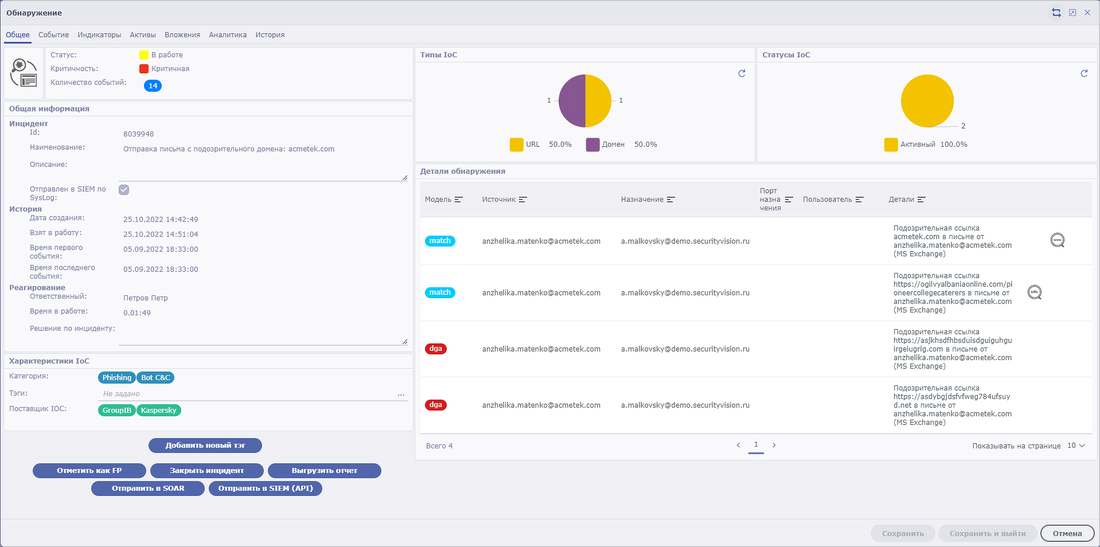
Based on the results of detected alarms, the system automatically creates detection incidents, which accumulate the information received from the event source, indicators and the system engine:
Infrastructure detection dates and criticality;
Lifecycle status and detection processing data (responsible, date of triggering, etc.);
Key characteristics of ‘triggered’ indicators and ‘engines’ (types, categories, tags, etc.);
List of triggered indicators with the ability to switch to the indicator card;
Activated assets (hosts, accounts, mail addresses, attachments);
Results of actions performed during the investigation/processing of the detection;
Organisations in which the detection was identified;
Event IDs from the source (e.g., in a SIEM system) and the total number of events;
‘Raw’ event data from the source;
History of changes to the detection data;
Chat to allow interaction between staff involved in investigating/processing the discovery;
Links to created incidents in external systems (IRP, SOAR, SIEM).
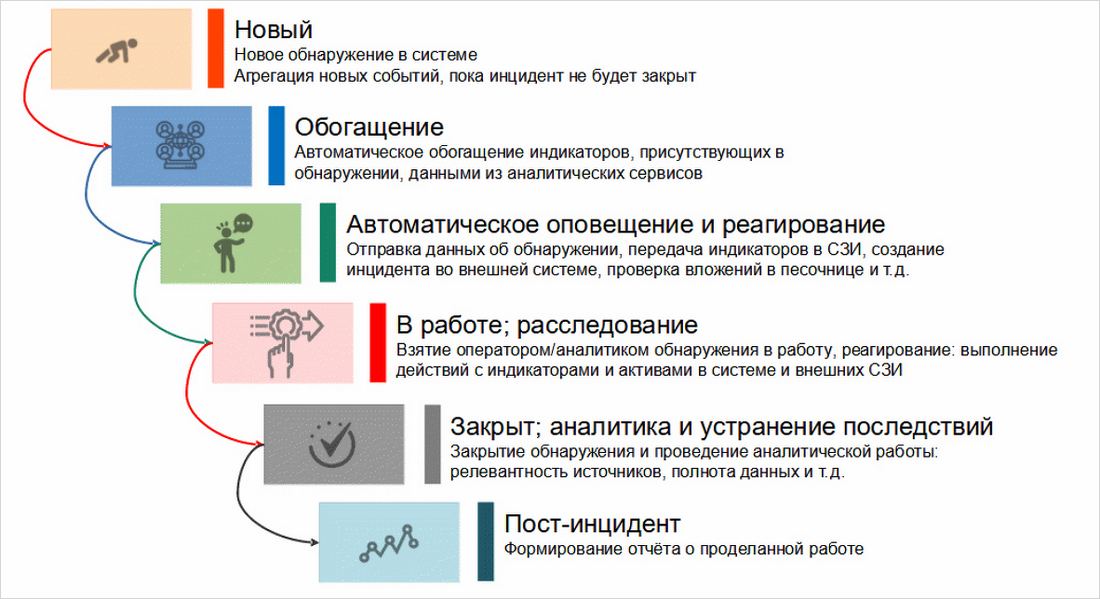
The system implements a lifecycle for detections, whereby each detection goes through a series of automated and manual steps during investigation and processing. For example, when a discovery is created or modified, all ‘triggered’ indicators are automatically enriched from external analytics services, and information is collected from the back-end infrastructure for all participating assets. Thus, when a user starts working with a discovery, they immediately receive the most complete information on the incident and the infrastructure involved.
As long as the discovery is not closed, all new information detected from new incidents is automatically added and aggregated, and data is deduplicated. The user receives a grouped set of events to be investigated and processed as a single incident.
When working with detection, the user has a number of preconfigured actions to handle detection and interact with external systems and involved assets. Examples of actions implemented in the system are:
Sending data to IRP, SIEM, SOAR;
Collecting data on hosts, accounts, processes, services, sessions, etc..;
Incident response: account lockout, host shutdown, mail account lockout;
Checking attachments in internal and external sandboxes;
Obtaining asset data from CMDB systems (MaxPatrol VM, etc.);
Submitting to NGFW blocklists;
Etc.
All actions can be configured by the user to be performed both manually and automatically. The set of actions can be extended through the constructor available in the platform and working in no-code mode.

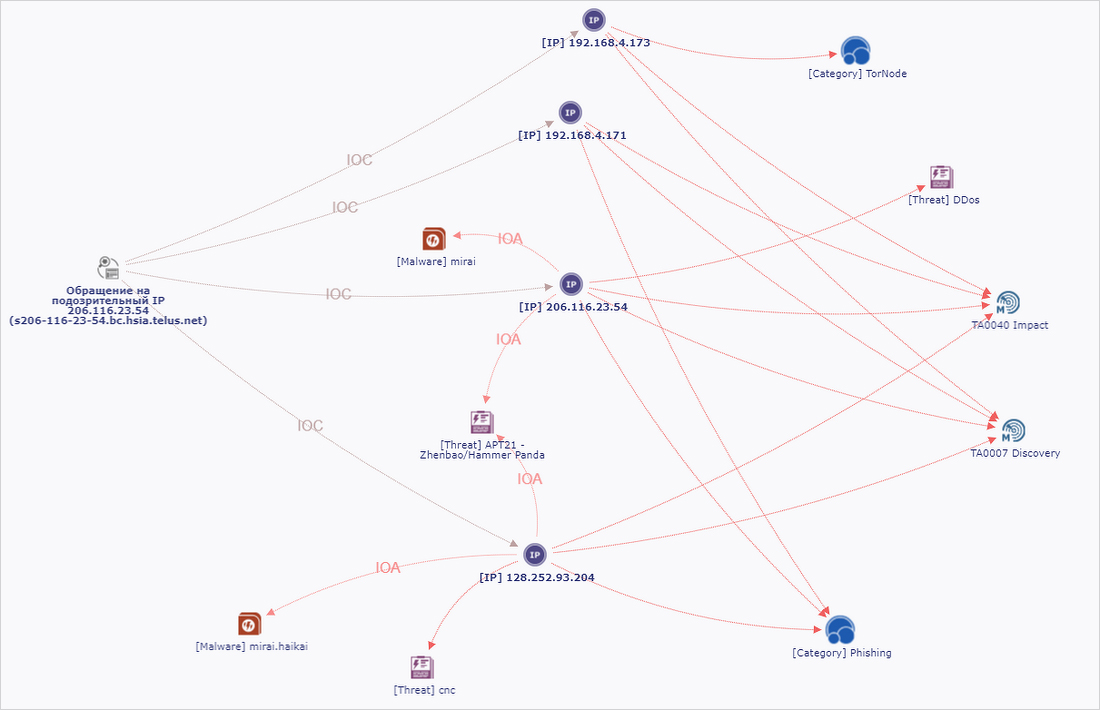
In the Analytics block, the user can investigate and analyse detection in graphical form. The data is presented in the form of a graph that displays:
All indicators related to detection;
IOA and threat sources;
Assets involved;
Additional attribution (e.g., MITRE ATT&CK, vulnerabilities, etc.).
On the graph, the user can perform linkage analyses, perform actions on assets and indicators, and open object cards.
On the discovery card, it is possible to upload a preconfigured report in a standard format (PDF, Word, Excel, ODS, ODT, etc.) containing all processing history and discovery data. The user can adjust the report format via the no-code constructor available in the platform.
Vulnerabilities
Many vendors, both domestic and foreign, provide up-to-date information on identified vulnerabilities. These can be software vulnerabilities, operating system vulnerabilities, and even hardware vulnerabilities. TIP features integration with the most well-known vendors and vulnerability databases, for example: NIST NVD, FSTEC BDU, NKCCI, Group IB, Kaspersky.
Vulnerability descriptions provide additional context to the compromise indicator. The system reflects in the vulnerability card information automatically aggregated from all knowledge bases with deduplication. Not only the information about the identified vulnerability, but also the vulnerability criticality assessment, the decomposed vector and even the descriptive part concerning mitigating actions with links to external resources are downloaded. This approach allows you to react in time and double-check the presence of this vulnerability at your perimeter, perform mitigation actions, and link the vulnerability to detected suspicious activity in the infrastructure. Excluding a vulnerability reduces the likelihood of an attack and the criticality of the threat.
From the vulnerability card, the user can download a report in a standard format that contains all relevant information on the vulnerability.
Bulletins
In Security Vision TIP you can work with bulletins - documents that are issued on a one-time or periodic basis and contain the results of the analytical centre's research on a particular problem/threat/attack/grouping, etc. or summary information for a certain period. The bulletin may contain a description of vulnerabilities, the latest threats and ways to counteract unlawful access to data. Bulletins are generated by organisations with expertise in the field of analytics and response to computer attacks, such as NCCI, FinCERT (Bank of Russia), Group-IB and others. The system implements preconfigured connectors for automated receipt of bulletins from suppliers, as well as the ability to create a bulletin manually.
IOA
In addition to information about low-level indicators of compromise, such as IPs, domains, hashes, etc., the Security Vision TIP data model includes attack indicators, such as registry keys, malicious processes and JARM (a tool for active fingerprinting to identify a malicious server), among others. The system is configured with out-of-the-box connectors for obtaining IOA from vendors and public/open-source sources and mapping IOA to compromise indicators. Information from the attack indicators is used to enrich (provide extended context for) the compromise indicators.
MITRE ATT&CK.
The Security Vision TIP functionality provides work with the MITRE ATT&CK knowledge base of techniques, its automatic maintenance in an up-to-date state in all main sections: description of tactics, techniques and sub-techniques, attacks, hacker tools and hacker groups, ways to counteract unauthorised access to data. Attack indicators are linked to compromise indicators through MITRE ATT&CK data, allowing for more efficient investigation of threat detection incidents.
Attribution
The strategic level of information security management is represented in Security Vision's TIP by an attribution mechanism for data types such as attackers, malware, and threats. The interaction of these three data types provides the most complete picture of potential threats, their criticality, level of development and propagation.
Alerts
Users of the Security Vision TIP platform can receive alerts for all new and monitored indicators, detections and changes in their status, and changes in their life cycles, including details of the new object, its changes, and links to the object card. In case of a large number of triggered objects, the data is automatically aggregated into a single notification. The system has preconfigured notification channels such as email, Telegram channel, file network resource, etc. Users can customise notification types and add their own filters for each set of monitored objects, as well as configure other notification channels through the platform's built-in constructors.
Role Model
The solution supports a role-based model, where the user has access to various system functionalities and limited access to data and actions depending on the assigned role. Several preconfigured roles are included in the platform delivery. Each role has its own set of actions, available data, reports and dashboards, as well as its own menu and display settings. Multiple roles can be assigned to a user, in which case the user will have the authority of all assigned roles.
If necessary, an unlimited set of roles can be created and each role can have its own accessibility settings for each object of the system. All settings are made through the constructor included in the platform.
Interface
TIP from Security Vision supports operation in light and dark themes for the entire used interface of the platform. These settings are set individually for each user. Multilingualism is also implemented - the system interface supports the use of several languages as basic for the entire system, as well as individually customised for specific users (Russian and English languages are included in the basic delivery set).
Dashboards
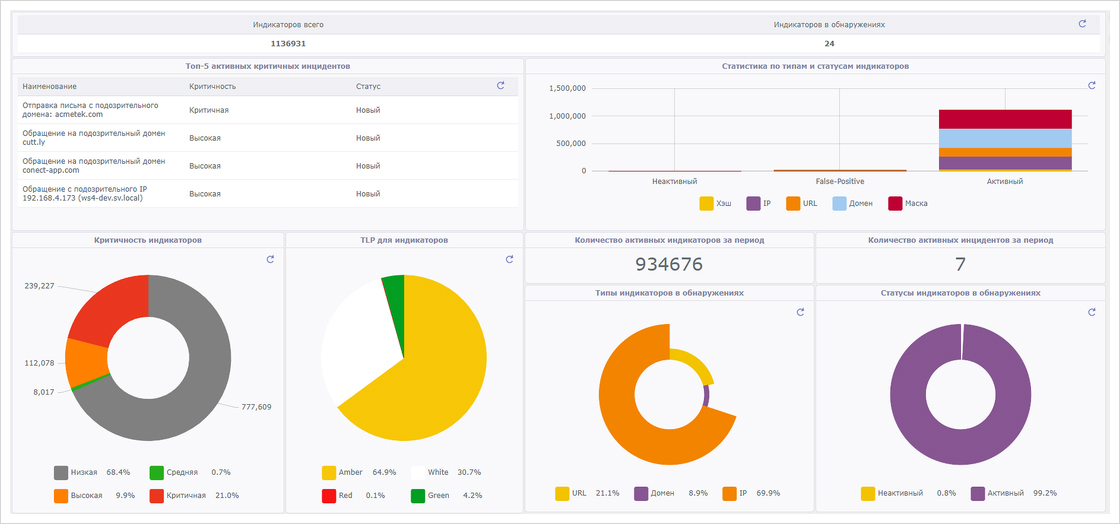
The Security Vision TIP platform includes several preconfigured dashboards that display key information on detections, indicators and other system data in operational, analytical and strategic perspectives.
All dashboards are automatically updated and interactive: the user can ‘plunge’ into the required data slice and see the source for calculating a particular indicator. For example, clicking on critical indicators in the pie chart will open a view with a list of all critical indicators active in the system. And if you click on a detection with the status ‘New’, a separate list will display a list of all new incidents that have not yet been accepted for work.
The user can also change the analysed period for each dashboard - key parameters are provided as input data for all displayed elements, with the ability to adjust their default values from the general interface of the dashboard.
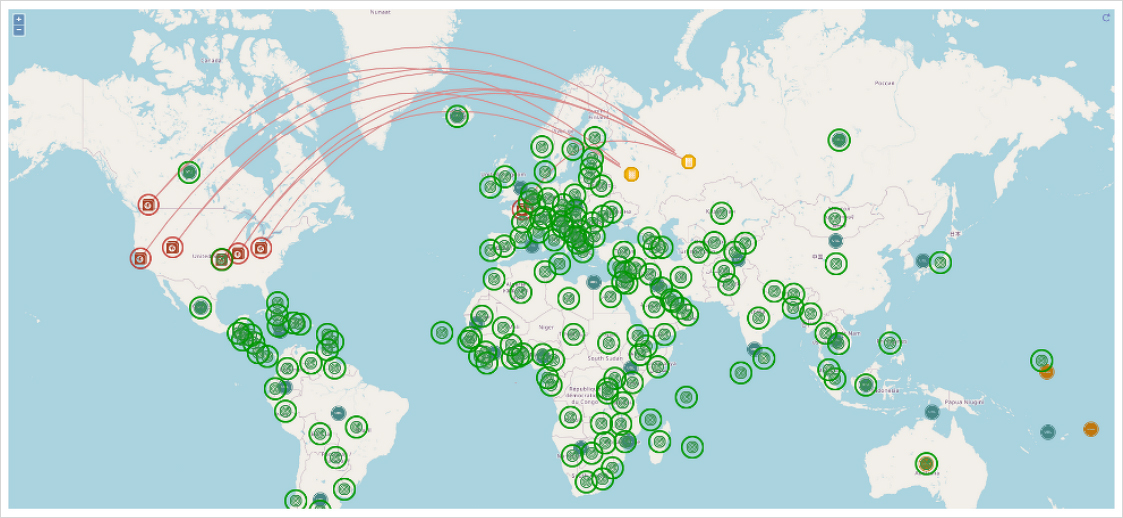
In order to visually track the geography of detections in real time, the Security Vision TIP platform features a graphical map that displays: triggered indicators and associated territorial offices of the Customer, where detections were detected; new indicators with their geographical location. All information is interactive: it is updated when data changes in the system, and clicking on an IOC/detection opens a card with details.
Dashboard Editor
The Security Vision TIP platform has a built-in editor of dashboards and displayed widgets, which requires no programming skills and works in no-code mode.
The user through the system interface can create and edit data sources (with the possibility of complex filtering, selection of object type and reference data, their linking and grouping, definition of input parameters, setting of calculation formulas), data display (pie chart, bar chart, line graph, table and many others), styles, actions (drill-down, etc.), location in the dashboard with the possibility to set any size for each element and many other settings and functionality that allows customising dashboards with any size and functionality.

Reports
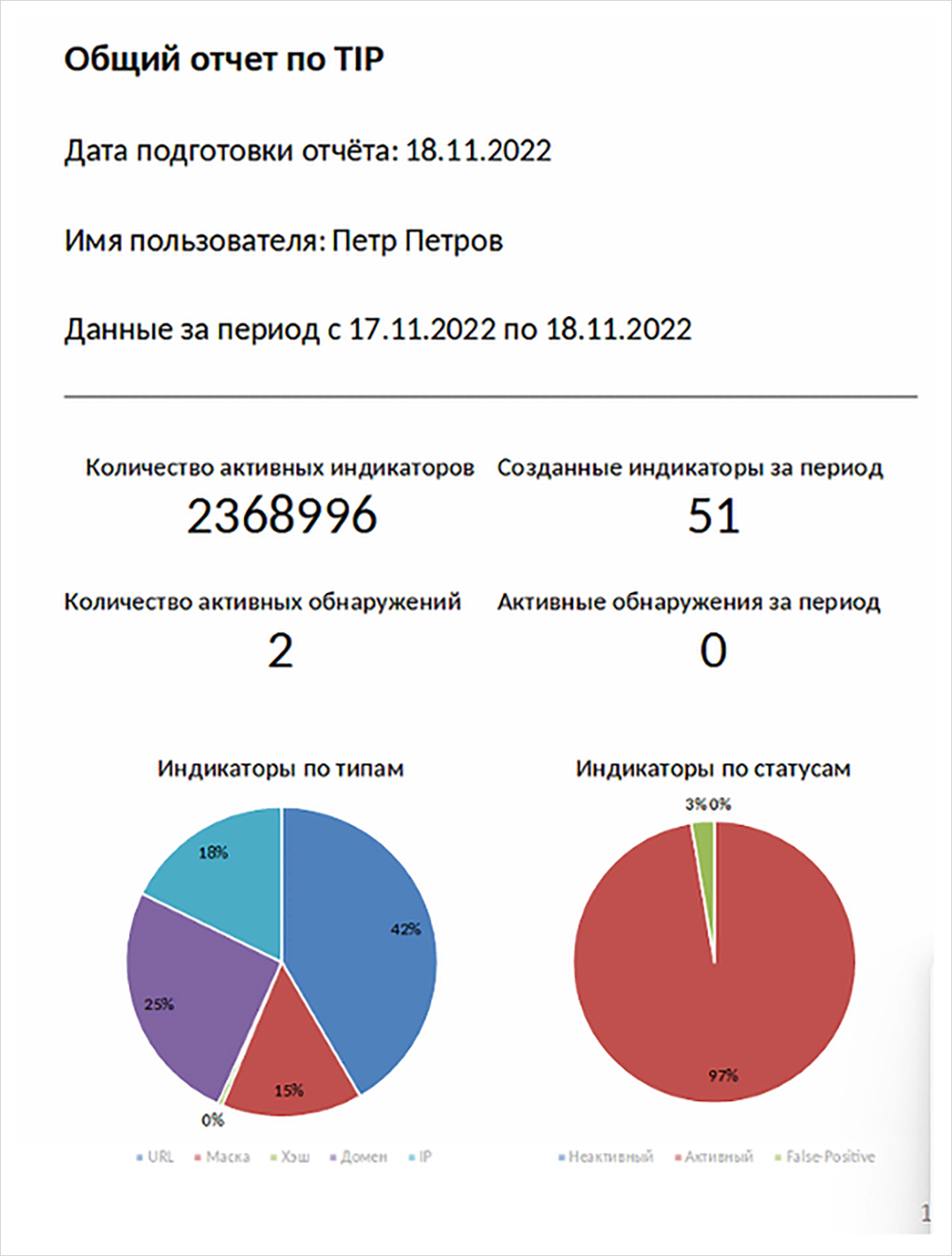
Security Vision's TIP solution includes preconfigured reports that allow you to upload data both on individual system objects - indicators, detections, vulnerabilities, etc., and consolidated reports that contain consolidated information on all data for the period and separately for each section of the TIP platform.
Consolidated reports can be uploaded manually by the user through a special section of the platform interface, where you can select the format of the uploaded report (Docx, Pdf, Xlsx, Ods, Odt, Txt) and, if necessary, adjust the input parameters for report generation (for example, the period for which the data is uploaded).
There is also a functionality of automatic scheduled distribution of reports to different channels and recipients: email, Telegram, File Server, databases, external APIs, etc. The system can be used to send reports to different channels and recipients.

Users of the Security Vision TIP platform can independently create new report templates through the inbuilt editor, the functionality of which is similar to the dashboard editor (with additional specific settings for each report format), which does not require programming skills and works in no-code mode.
In conclusion, we note that TIP from Security Vision complies with the ideology of technological sovereignty, being a fully domestic product.
Security Vision SGRC (Security Governance, Risk, Compliance)
The functionality of the following SGRC modules has been significantly expanded: information security risk management module, audit management module and compliance module. These products allow to organise risk assessment processes based on threat modelling, audits and compliance checks to various standards, the list of which is based on internal and generally accepted (GOST, ISO/IEC) methods. In the process of setting up the system, individual actions can be automated, for this purpose external data sources and application processing systems are connected to the platform using connectors that can be created directly within the graphical interface without using programming languages and without involving developer representatives.
The engines of all modules have been significantly improved
- Increased number and depth of integrations with other systems. Built-in connector builder allows to provide integration with any (even self-written) system using universal tools:
- API (HTTP requests);
- databases (SQL interaction with Postgres, Oracle, MS SQL, etc.);
- scripts (PowerShell, SSH);
- files in read/write mode (machine-readable files, including XML/JSON of any size due to parallel processing of fragments);
- syslog;
and proprietary protocols, including:
- MS AD;
- MS Exchange;
- Kafka.
- Improved tools for presenting large and complex data: enhanced visualisation capabilities (timeline widget), added new interactive observation tools, updated built-in BI engine to create any number of widgets for analysis and investigation.
- The integrity of the system and all data, regardless of content, has been strengthened: a single installer and platform ensures any interconnection of objects (controls, assets, risks and protection measures), enables end-to-end analytics and links to and from the Security Vision technology modules (asset management, vulnerability management, incident management, threat analysis and cyber intelligence).
- Customisation, including the creation of new dashboards and templates for uploaded reports, is carried out in the already installed system and does not require the release of separate versions of the product, which ensures the speed of implementation when the customer needs to change the logic of work to meet its own requirements and methods.
The operating logic of the cybersecurity risk management module includes:
- Maintaining various directories and object databases. IT assets, their associations in information systems and objects of influence, lists of threats, ways of their realisation and applied protection measures, as well as the potential of intruders are developed and filled with content.
- Threat model updates, e.g. the results of threat modelling according to the FSTEC methodology and the official BDU website. Threat modelling can be carried out according to any industry-specific or customer-specific methodology, for this purpose new templates are created or current templates are modified using the inbuilt constructors via the UI.
- Initiating the risk assessment process. When starting this process, the risk manager defines a working group, includes experts, engineers for processing tasks, users for coordination and approval. Each user is given rights according to the role model.
- Filling out questionnaires. For simplification, reference books formed in the first stage are used, connectors to external systems, files and databases that contain useful information are used.
- Mathematical transformations. The methodology of qualitative risk assessment ‘out of the box’ can be adapted already in the process of implementation and operation. Application of mathematical formulas and construction of processes in the form of block diagrams allow to realise processes of any complexity, they can be cyclic and ‘branching’ (to have different variants and algorithms depending on conditions).
- Risk processing, including maintenance of individual tasks and their prioritisation for performers. Depending on the criticality of assets, detected vulnerabilities and other parameters, it is possible to define the logic of assigning SLAs for all tasks.
Cyclicality of the process and overriding controls according to a set schedule keeps all metrics and tasks related to cybersecurity risk assessment up to date.
TheAudit and Compliance modules , depending on specific methodologies, GOST, ISO/IEC requirements, contain separate preconfigured guides, but generally include:
- Launching workflows for individual audit procedures;
- Completion of questionnaires involving the necessary participants in the process;
- Evaluating the implementation of measures;
- Creating tasks for remediation of observations;
- Running remediation processes and reporting with audit closure.
Descriptions of objects (audits, procedures, IS characteristics) include dozens of parameters with the possibility to create new parameters, input fields, attach external files and certificates without limitation in number.
Information security audit of critical information infrastructure (CII) objects is based on the RF Government Decree No. 127 and FSTEC Orders No. 235, 236 and 239 and includes:
- Initialisation of the categorisation procedure for various IS, determination of parameters of significance of CII objects (CIII);
- Defining the categorisation and protection measures with different parameters (description, technologies, implementations);
- Initialisation of the conformity assessment process according to the regulator's requirements mentioned above;
- Identification of non-conformities and formation of a plan of control measures with indication of deadlines, priority.
Execution of measures and transition to re-assessment allow to organise a cyclic process and support of data in the actual state. It is also possible to maintain regulatory enquiries and related tasks.
Security Vision IRP/SOAR
The new version of the product implements unique methods of investigation and response to IS incidents based on dynamic playbooks technology, and all stages of incident processing are maximally automated.
The most significant features are:
Incident Classification
Security Vision IRP/SOAR automatically classifies an incident by linking it to MITRE ATT&CK matrix techniques and tactics. The system can classify more than 250 types of IS incidents and events, assigning more than 110 different techniques and tactics to them. The expertise package built into the system details a set of recommendations for the IS analyst to analyse, contain and respond to each identified technique.
Response
Security Vision IRP/SOAR, based on dynamic playbook technology, assembles on-the-fly a response process tailored to the identified attack and the infrastructure involved. Based on MITRE techniques and tactics, raw data in the vicinity of the incident, the result of retrospective analysis, data from external analytical services and internal expertise, the system builds a dynamic playbook. It is assembled from more than 150 different actions and atomic response scenarios. At the same time Security Vision IRP/SOAR is able to control the legitimacy of automated actions, taking into account the specifics of the customer's infrastructure: its confidentiality, permissions, segmentation and topology.
Kill chain
The Security Vision IRP/SOAR expert engine automatically builds kill chain attacks from events and incidents by analysing hidden relationships. The analysed events and incidents can be obtained both from SIEM systems and Data Lake (Kafka, Hadoop, Elasticsearch, etc.), and directly from the end devices of the customer's infrastructure using the data correlation and grouping mechanisms built into the product. Additionally, a sigma rule-based forensics package is built into the product, which allows to detect all affected infrastructure elements, expand and define the attack landscape.
Investigation and Response Graph
Security Vision IRP/SOAR is able to represent incidents and events in the form of a graph, the functionality of which allows to build non-obvious connections, directly perform deep analytics (through enrichment and sigma queries), perform investigation and response, selecting specific actions. Based on need, countermeasures, deterrence and digital forensics are applied. At each step of the investigation, the user sees key relationships and attributes, building a complete picture of the incident.

Integrations
Security Vision IRP/SOAR features a large number (over 150) of built-in connectors for integration with all popular SIEM systems (MaxPatrol SIEM, KUMA, Pangeo RADAR, RuSIEM, NEURODAT SIEM, ArcSight SIEM, QRadar, Splunk, etc.), with the customer's infrastructure, including endpoints (Windows/Linux systems), anti-virus systems (NGFW, DLP, Anti-Virus, EDR, sandboxes). In addition, Security Vision IRP/SOAR offers an extended number (more than 30) of built-in integrations with analytical services (both external and internal), which allow to collect all necessary information on incident attributes required for investigation. Security Vision IRP/SOAR is able to work with a variety of data types, unifying them and producing normalised results.
The platform's built-in integration builders allow for quick, no-code implementation of additional integrations with any new or unique customer systems, expanding the investigative, response and action capabilities that can be performed on customer infrastructure.
The product also has built-in integration mechanisms with NCSCI and FinCERT.
The product uses an agentless method of operation to collect incident and infrastructure data, conduct incident and IS event response, and does not require any additional components to be installed on endpoints, Windows/Linux servers and workstations.
Flexible role model
To manage the incident investigation process, the product has a flexible role model that allows you to differentiate access to each field and attribute of the incident and IS event during the investigation. The investigation process is highly customisable, allowing it to be adapted for both small teams working on incident investigation and large SOC centres, with flexible configuration of applicable response levels (L1, L2, L3), escalation, post-analysis and integration with the customer's external Service Desk. The product supports multitenancy and can also be used under the MSSPP model.
Native integration with Security Vision product line
The product works even more efficiently due to native integration with the Security Vision product line and joint use with TIP, UEBA, CMDB, Vulnerability management, SGRC modules. The Security Vision product ecosystem enables comprehensive coverage of all areas of information security in an organisation.
Process and automation
All stages of incident handling are implemented and automated as much as possible in the product:

Security Vision UEBA and Security Vision Anomaly Detection
Security Vision UEBA automatically builds typical models of behaviour (users, accounts, devices, processes, etc.) and finds deviations by analysing raw data streams on network traffic, proxy servers, mail servers, Windows/Linux servers and workstations.
Security Vision Anomaly Detection extends the ability to detect anomalies in the corporate infrastructure by applying a large number of different Machine Learning models and techniques, stacking the results of individual models and aggregating the resulting events into incidents for further investigation.
The most significant capabilities of Security Vision UEBA:
Integration with data sources
The Security Vision UEBA product contains configured connectors for receiving, normalising and analysing raw data from all popular SIEM systems (KUMA SIEM, MaxPatrol SIEM, Pangeo RADAR, RuSIEM, NEURODAT SIEM, ArcSight SIEM, QRadar, Splunk, etc.), the ability to receive events in universal formats (CEF, LEEF, etc.), connectors to NG systems (KUMA SIEM, MaxPatrol SIEM, Pangeo RADAR, RuSIEM, NEURODAT SIEM, ArcSight SIEM, QRadar, Splunk, etc.), the ability to receive events in universal formats (CEF, LEEF, etc.), and connectors to NG systems. ), connectors to NGFW and network devices (Cisco, CheckPoint, PaloAlto, Juniper, etc.), proxy servers (Squid, Blue Coat), ‘data lakes’ (Kafka, Elasticsearch), as well as receiving logs directly from Windows/Linux devices and workstations.
Integration builders built into the platform allow you to quickly implement additional integrations with any other data sources using a large number of protocols in no-code mode, including a graphical builder for normalising the data received.
Customisable rules and analytics engine
Users have access to dozens of built-in rules for statistical analysis of various parameters of user activity, accounts, hosts, processes, as well as traffic volumes, number of connections, etc. The product's functionality allows flexible expansion and customisation of new analysis rules, setting their activity, evaluation and threshold of influence on the creation of the final incident.
The platform also includes a full-fledged correlation rules engine, which can be used to configure rules of any depth and complexity. For example, the product comes with sigma rules and typical correlation rules.
Incidents and response
All detected deviations are automatically aggregated with respect to the alarm object. When specified thresholds are exceeded, the system generates an incident that reflects all detailed information about the incident object, related objects and all detected abnormal events.
Automated actions are configured in the product to process incidents: sending to IRP/SOAR systems, sending to SIEM, adding to SIEM Active List, adding to blocking lists on NGFV, blocking in directory service, etc. The user can adjust the actions performed by the product by settings. The user can adjust the actions performed by settings: enable their execution automatically or manually, control their visibility on the incident card. Incident notifications can be managed in the same way.
The system automatically creates separate objects for all related incident attributes (devices, accounts, etc.). For each object, collection and enrichment with additional data from the customer's infrastructure or from external analytics services are automatically triggered. The process of data collection and enrichment is regulated by the system settings.
To work with identified incidents and related objects, the product has built-in workflows that manage the incident lifecycle, enrichments, and enable actions. The workflow builder built into the platform allows users to customise the required response process and configure interactions with external systems.
Flexible options are available in the platform to create and customise additional response actions, data collection and enrichment of both the received incident and all associated customer infrastructure or external systems.
Visualisation and reporting
In the incident card, all detected events for an object are displayed in Timeline view, following the chronology of their occurrence. A large number of links to related objects (devices, accounts, processes, etc.) allows you to navigate to their cards for additional data and analysis.
Additionally, all related objects and attributes are displayed in the form of a graph, which allows you to build links between incident objects and quickly jump to detailed information on them. The user can add additional actions to the graph to respond, enrich the data, or build additional relationships.
General views and dashboards allow you to view summary information on all identified objects, according to a calculated rating. Drill-down allows you to view detailed information for each analysis group.
For each object in the system there is a possibility to upload reports containing all detailed information on detected alarms and objects of violations. Summary reports for a period can be uploaded manually or received on schedule via various channels: e-mail, Telegram, etc.
The reporting and dashboard builder built into the platform allows users to independently configure the required reporting and data visualisation in no-code mode without the use of any external products and tools.
The most significant capabilities of Security Vision Anomaly Detection:
In addition to all of the above capabilities, the user receives a large number of preconfigured and trained Machine Learning models that significantly enhance the ability to detect anomalous and suspicious activities in the corporate infrastructure that are not detected by correlation rules and functionality of standard antimalware systems.
The product uses various ML techniques, trained models on various datasets related to the activity of botnets, VPO, DDOS attacks, etc., ‘teacherless’ models that automatically approximate activity and detect deviations by various combinations of parameters, neural networks that take into account the sequence of events and their relationships, etc. The resulting alarms are automatically processed, grouped into sets of events, and data deduplication is applied.
The models used in the product are automatically retrained on the customer's data on a regular basis, adapting to the infrastructure settings, network, technical and user activity. Both manual and automatic selection of model parameters is used to improve the quality of detected alarms.
The product has built-in whitelisting capabilities to customise exceptions. Also, the models automatically take into account false-positive alarms during the subsequent retraining of the models.


